
If you’ve ever spent hours copying numbers from invoices or typing customer information into spreadsheets, you know how painfully slow and repetitive data entry can be. In 2025, though, those long nights hunched over Excel sheets are becoming a thing of the past.
Welcome to the era of smart data entry software — where artificial intelligence (AI), automation, and intelligent document processing are transforming how businesses handle information. From small startups to enterprise-level corporations, everyone is now searching for one thing: speed, accuracy, and automation.
At SoftNexusHub.site, we explored dozens of tools — from traditional spreadsheet programs to advanced AI-powered automation software — and compiled the most efficient, easy-to-use, and cost-effective solutions for you. Whether you’re managing invoices, survey responses, or large data imports, this guide will help you pick the best tool for your workflow.
What Exactly Is Data Entry Software?
Think of data entry software as your digital assistant that collects, organizes, and processes data faster than any human ever could. It can be as simple as Excel for basic number entry or as powerful as AI systems that scan invoices, read PDFs, and input data automatically into CRMs or accounting software.
There Are Two Main Types:
- Manual Data Entry Tools:
These still require you to type data yourself. They’re great for smaller teams and simple data organization tasks. Examples: Microsoft Excel, Google Sheets, Zoho Forms. - Automated Data Entry Software:
These tools use AI and machine learning to recognize patterns, extract data from unstructured documents (like emails, PDFs, or forms), and automatically fill it in where needed. Examples: Parseur, UiPath, and other RPA-based tools.
The difference? Manual entry is time-consuming and error-prone. Automation, on the other hand, saves hours of repetitive work and drastically improves accuracy.
Why Manual Data Entry Still Exists (and Why It’s Fading Fast)
Believe it or not, 70% of manufacturing companies still rely on manual data collection (according to the Manufacturing Leadership Council). Many small businesses prefer it because it feels familiar — and spreadsheets like Excel and Google Sheets are easy to use.
But here’s the catch:
Manual data entry can eat up 25% of an employee’s weekly time. It also leaves room for human error — typos, missed numbers, duplicate records — all of which can lead to major data integrity problems.
So while manual tools have their place, the future clearly belongs to automation.
Top Data Entry Tools in 2025
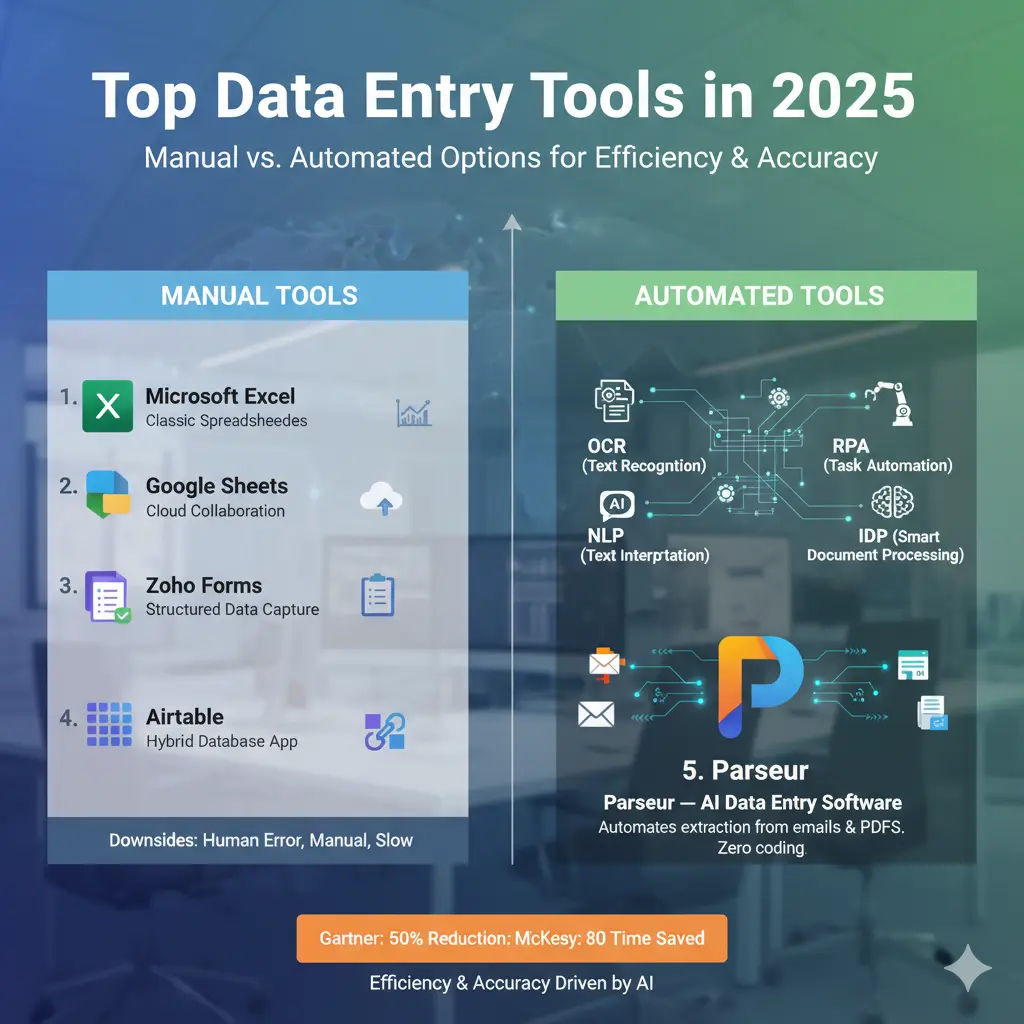
Below we’ve divided the best options into manual and automated tools so you can choose based on your needs and budget.
1. Microsoft Excel — The Classic Spreadsheet Powerhouse
Even after decades, Excel remains the backbone of data entry and analysis for countless organizations. It’s perfect for structured data, advanced calculations, and data visualization.
Key Features:
- Powerful formulas and PivotTables for quick calculations
- Charts and graphs for clear data presentation
- Integration with other Microsoft 365 tools
Why People Still Love It:
- It’s reliable and widely used
- Offers deep customization for almost any data need
Downsides:
- Prone to human error
- Can’t easily handle massive datasets or automate workflows
Pricing:
Free basic version available; advanced plans start at $9.99/month (Microsoft 365 subscription).
2. Google Sheets — Collaboration Meets Cloud Efficiency
Google Sheets is Excel’s smarter, more social sibling. It’s perfect for teams who need to work together in real-time.
Features:
- Multi-user editing
- Cloud storage and autosave
- Seamless integration with Google Workspace
Why It’s Great:
- Accessible anywhere with an internet connection
- Ideal for small teams and freelancers
- Free for personal use
Drawback:
Performance slows down with very large files and lacks native automation.
3. Zoho Forms — Structured Data Made Simple
If your work revolves around collecting form responses, Zoho Forms makes it easy to design forms, collect data, and export it directly into your system.
Highlights:
- Drag-and-drop builder
- Conditional logic
- Integrations with Zoho CRM, Mail, and third-party apps
Why It Stands Out:
- User-friendly
- Streamlined for repetitive form-based data collection
Pricing:
Starts at $10/month per user.
4. Airtable — The Hybrid Between Spreadsheet and Database
Airtable combines the flexibility of Excel with the structure of a database. It’s like upgrading your spreadsheet to a mini-app.
What Makes It Awesome:
- Customizable views (grid, calendar, gallery, kanban)
- Built-in collaboration tools
- Integrates easily with apps like Slack and Zapier
Pricing:
Free for individuals; premium plans from $20/user/month.
The Shift to Automation: Why Businesses Are Moving On
So, what’s fueling the migration from manual tools to AI-powered automation? Two things: efficiency and accuracy.
According to Gartner, automation can reduce operational costs by up to 50%, while McKinsey reports an 80% reduction in time spent on data processing when automation tools are implemented.
The technologies driving this shift include:
- OCR (Optical Character Recognition): Converts scanned images and PDFs into editable text.
- RPA (Robotic Process Automation): Automates repetitive tasks across software systems.
- NLP (Natural Language Processing): Reads and interprets unstructured text, like emails.
- IDP (Intelligent Document Processing): Uses AI to extract structured data from documents.
Automation isn’t replacing your favorite tools — it’s enhancing them.
5. Parseur — The AI Data Entry Software Changing Everything
If there’s one name leading this revolution, it’s Parseur. This powerful tool automates data extraction from emails, PDFs, and scanned files and sends it directly to your spreadsheets or CRMs in real time.
Why Parseur Is a Game-Changer:
- AI-powered document recognition
- Real-time data transfer to Google Sheets, Excel, or Airtable
- Works with Zapier and Make for full workflow automation
- Zero coding required
Real-World Example:
Marketing agency owners use Parseur to extract client order details directly from emails into their project management tools — no more copy-pasting!
Industry Benefits:
- Finance: Automated invoice entry reduces billing errors
- HR: Extracts applicant data from resumes automatically
- Logistics: Real-time tracking of shipment data from emails
Pricing:
Free tier available; paid plans scale based on volume.
How to Choose the Right Data Entry Software for Your Business
Selecting the right software depends on your business size, data complexity, and integration needs. Here’s a quick guide:
- Define Your Needs:
Small businesses may only need Excel or Google Sheets, while growing companies benefit from AI-driven automation. - Check Integration:
Make sure the software connects with tools you already use (CRM, ERP, accounting software, etc.). - Look for Scalability:
As your business grows, your data handling capacity should too. - Automation Features:
Prioritize tools offering OCR, RPA, or API-based automation if you handle large data volumes.
Expert Insights: The Future of Data Entry
At SoftNexusHub.site, we reached out to tech consultants and AI professionals to understand how automation is reshaping data management. Here’s what they shared:
Joshua Odmark (CIO, Local Data Exchange):
“Machine learning has reduced manual entry by nearly 80% for our clients. While full automation isn’t always possible, the blend of AI and human oversight is the future.”
Konrad Martin (CEO, Tech Advisors):
“Companies still relying on manual input will struggle with inefficiencies. Early adopters of automation already enjoy a major productivity edge.”
Yarden Morgan (Director, Lusha):
“Our smart forms cut data entry time by 40% and boosted accuracy. Automation frees employees for higher-level tasks.”
The Bottom Line: Automation Isn’t a Luxury—It’s a Necessity
In 2025, efficient data management isn’t optional—it’s the backbone of business success. Whether you’re handling customer feedback, financial reports, or product inventories, automating your data entry process saves time, reduces costs, and boosts accuracy.
Data entry software today does more than just record information—it helps businesses make smarter decisions, faster. And the best part? You can still keep using familiar tools like Excel or Google Sheets—just let automation handle the boring parts.
Conclusion
As data continues to drive every industry, the shift toward automation is only accelerating. The right data entry software can transform how your business operates—eliminating errors, saving time, and letting your team focus on what truly matters: growth and innovation.
Whether you’re a freelancer managing spreadsheets or a company processing thousands of documents daily, 2025 is the year to stop typing manually and start automating intelligently.
FAQs
1. How to do data entry in Excel efficiently?
Use Excel’s built-in templates, validation rules, and formulas. Pair it with automation tools like Power Query or Zapier for faster workflows.
2. What is the fastest way to enter data in Excel?
Enable AutoFill, use keyboard shortcuts, and automate repetitive tasks using Excel macros or AI-based plugins.
3. Can I automate data entry in Excel or Google Sheets?
Yes! Tools like Parseur, Zapier, and UiPath can automatically transfer data from emails or PDFs into your sheets without manual input.
4. What’s the best free data entry software?
Google Sheets and Zoho Forms offer free plans. For automation, Parseur provides a free tier for low-volume users.
5. Do I need a data entry certification to use these tools?
Not necessarily. Most modern tools are beginner-friendly and intuitive, though online data entry courses can help you master automation faster.